
Component:Image
A user can use this to just display an image with an optional tint color, or have this as a background image for other images to be on top of.
More actions
(Redirected from Image (Component))
Component image 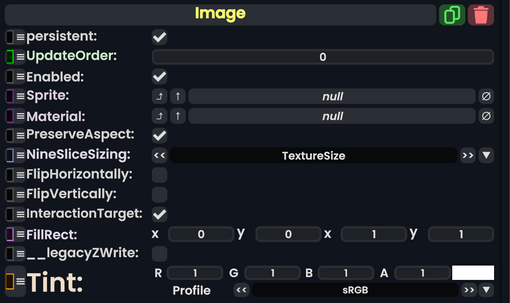
Image component as seen in the Scene Inspector

The Image component takes in a SpriteProvider or Material and renders it onto the UIX. This can be used to display graphics and produce backgrounds.
| Name | Type | Description |
|---|---|---|
persistent
|
Bool | Determines whether or not this item will be saved to the server. |
UpdateOrder
|
Int | Controls the order in which this component is updated. |
Enabled
|
Bool | Controls whether or not this component is enabled. Some components stop their functionality when this field is disabled, but some don't. |
Sprite
|
Sprite | The sprite to render |
Material
|
Material | The material to render with. is not required. |
PreserveAspect
|
Bool | Preserves the aspect ratio of this image provided. |
NineSliceSizing
|
NineSliceSizing | Tells how the image gets 9-sliced on this UIX. |
FlipHorizontally
|
Bool | Flips the image horizontally. |
FlipVertically
|
Bool | Flips the image vertically. |
InteractionTarget
|
Bool | Makes this image as the interaction target for this UIX. |
FillRect
|
Rect | The filling rect for this image. |
__legacyZWrite
|
Bool | Internal - The legacy Z writing for this image. |
Tint
|
ColorX | A color that is multiplied with the material's color. |
Usage
A user can use this to just display an image with an optional tint color, or have this as a background image for other images to be on top of.
Examples
Here is ProbablePrime's tutorial on images: