Toggle menu
Toggle preferences menu
Toggle personal menu
Not logged in
Your IP address will be publicly visible if you make any edits.

Component:AudioInputDeviceInfo: Difference between revisions

From Resonite Wiki
add info
info
 
Line 2: Line 2:
<translate>
<translate>
<!--T:1-->
<!--T:1-->
{{UserspaceComponent}}
{{Infobox Component
{{Infobox Component
|Image=AudioInputDeviceInfoComponent.png
|Image=AudioInputDeviceInfoComponent.png

Latest revision as of 23:58, 3 May 2025

This is a Userspace component — It has reduced or no functionality outside of userspace but it can be attached to objects in a normal world. Changing components in userspace is not recommended and may break functionality of your dashboard. Proceed with caution even if you know what you're doing.
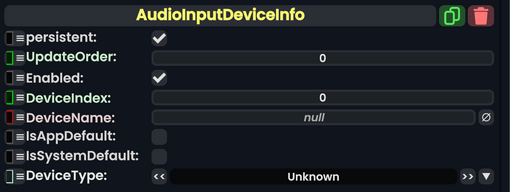
Component image 
Audio Input Device Info component as seen in the Scene Inspector

The AudioDeviceIndexFinder component only works in user space, and is used to find an audio device by name and get info about it.

Fields

Fields
Name Type Description
persistent Bool Determines whether or not this item will be saved to the server.
UpdateOrder Int Controls the order in which this component is updated.
Enabled Bool Controls whether or not this component is enabled. Some components stop their functionality when this field is disabled, but some don't.
DeviceIndex Int The device index if found
DeviceName String the name to use when looking for a device
IsAppDefault Bool Whether this device is resonite's current default
IsSystemDefault Bool Whether this device is the user's OS current default
DeviceType AudioInputType The type of audio device this is.

Usage

Examples

This article or section is a stub. You can help the Resonite wiki by expanding it.

See Also