
Component:Tween
The Tween component is usually auto generated by ProtoFlux or by holding an object and hitting primary to align the object.
More actions
Component image 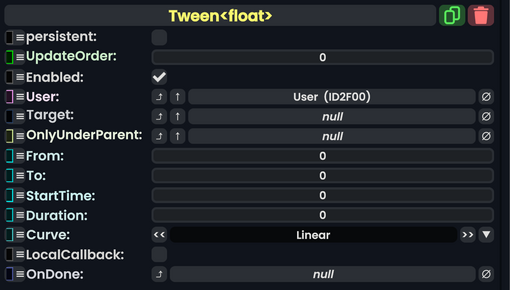
Tween<t> component as seen in the Scene Inspector

The Tween component is usually auto generated by ProtoFlux:TweenValue or by holding an object and hitting primary to align the object. The purpose of this component is to handle transitions in a value to value manner and only exists temporarily. This is not used for animations, only for a transition from one value to another. For animations, see either Component:ValueGradientDriver or Component:Animator
Fields
| Name | Type | Description |
|---|---|---|
persistent
|
Bool | Determines whether or not this item will be saved to the server. |
UpdateOrder
|
Int | Controls the order in which this component is updated. |
Enabled
|
Bool | Controls whether or not this component is enabled. Some components stop their functionality when this field is disabled, but some don't. |
User
|
User | The user handling the processing for this component. |
Target
|
IField`1<T> | The field to drive and Tween. |
OnlyUnderParent
|
Slot | Only run the component if it exists under the hierarchy of this slot, else stop the tween. |
From
|
T | The value to start at |
To
|
T | The value to end at. |
StartTime
|
Double | The world time this Tween should start. Usually is creation time. |
Duration
|
Float | How long from StartTime the Tween should go for.
|
Curve
|
CurvePreset | How Target should transition from From to To. See CurvePreset
|
LocalCallback
|
Bool | Whether the Callback should be executed by User
|
OnDone
|
delegate of identity Action | The Sync Method to call when this is done tweening. |
Usage
Users should not use this directly, and instead use ProtoFlux to Invoke this component's behavior.
Examples
This article or section is a stub. You can help the Resonite wiki by expanding it.