Toggle menu
Toggle preferences menu
Toggle personal menu
Not logged in
Your IP address will be publicly visible if you make any edits.

Component:MultiValueTextFormatDriver

The MultiValueTextFormatDriver applies the values of multiple source fields to a text format string and drives the target string field.


Component image 
Multi Value Text Format Driver component as seen in the Scene Inspector

The MultiValueTextFormatDriver applies the values of multiple source fields to a text format string and drives the target string field. Each {N} placeholder refers to an item in Sources by index, starting at 0. Enum sources are converted to their name before formatting.

Fields

Fields
Name Type Description
persistent Bool Determines whether or not this item will be saved to the server.
UpdateOrder Int Controls the order in which this component is updated.
Enabled Bool Controls whether or not this component is enabled. Some components stop their functionality when this field is disabled, but some don't.
Sources direct SyncRelayList`1<IField> A list of source fields.
Format [[Type:String|String]] The format string. See: String formatting or examples bellow.
Text field drive of String The target field.

Usage

Attach to a slot and provide a format string and source values in order to drive a string field (such as text on a TextRenderer or UIX label) without involving ProtoFlux.

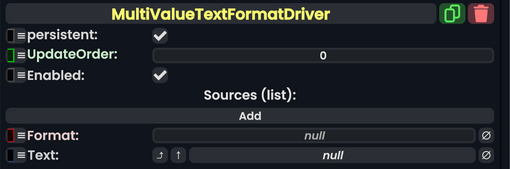
To use the component:

  1. Attach a MultiValueTextFormatDriver to a slot.
  2. Link Text to the String field you want to update.
  3. Add source fields to Sources in order (first item = {0}, second = {1}, and so on).
  4. Set Format to your format string.

The formatted result is written to Text whenever a source changes. Invalid format strings fail silently and produce no output.

For details of the Format string, see: String formatting#Composite Formatting

Examples

See: String formatting#Examples

See Also