Your IP address will be publicly visible if you make any edits.
Component:SkinnedMeshRenderer
SkinnedMeshRenderer component is used for rendering animated/dynamic 3D meshes in the world, and applying materials to that mesh.
More actions
This article or section is a stub. You can help the Resonite wiki by expanding it.
Component image
SkinnedMeshRenderer component as seen in the Scene Inspector
The SkinnedMeshRenderer component is used for rendering animated/dynamic 3D meshes in the world, and applying materials to that mesh.
While it can be used for rendering static meshes, it is not recommended as there is a slight performance penalty for using SkinnedMeshRenderer, even if the animation features aren't used — Please try to use MeshRenderer where possible.
It also has a powerful set of tools for working with rigged meshes in game, including ways to remove blendshapes and separate out meshes.
A list of material property blocks to apply to the materials on this mesh. Usually used for performance reasons where using multiple similar materials would take more resources.
Will merge all submeshes that use the same material
Usage
While it can be used for rendering static meshes, it is not recommended as there is a slight performance penalty for using SkinnedMeshRenderer, even if the animation features aren't used — Please try to use MeshRenderer where possible.
Optimization
StripEmptyBlendshapes and StripEmptyBones can be useful for removing unneeded bones or blendshapes. They remove Blendshapes and Bones that don't 'do' anything to the mesh referenced by the component. While they don't have any real performance impacts it does clear up a lot of visual clutter from the interface and makes working on assets easier. For example by removing empty bones from a clothing item it's easier to see what bones actually need to be referenced.
Blendshape removal
Blendshape Context Menu
Blendshapes are adjustable transforms that modify the original mesh in some way. They are used for a lot of the customization in avatars as well as jaw or expression movements.
For a number of reasons, from performance to removal of unwanted assets, you may wish to delete blendshapes and there are tools to help, depending on how your avatar was created different methods may work in different ways, for example some blendshapes simply move mesh inside the main body but don't change the mesh, such as claws or horns. Others may shrink the mesh down to a very small size, for example clothing and others still change the main mesh it'self, for example blendshapes that change the size of body parts.
RemoveBlendshape
This removes the controls for the blendshapes, it may not change the original data.
Things gone wrongSeparateOutBlendshapes
Duplicates the parts of the mesh that would be changed by the blendshape and makes it into a separate mesh that can then be deleted or disabled as another item.
This is commonly used to make clothing that is done as blendshapes into separated meshes.
When this works this is also is one of the be the most secure way to remove a blendshape, it can break some avatars.
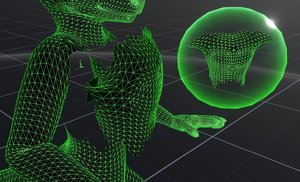
Example of a visually hidden but still present mesh
BakeBlendshape
'Bakes' the blendshape into the selected position, depending on exactly what it does, it can either completely remove or leave traces of the original mesh behind.
If being used to remove an asset care should be taken to ensure that the asset is completely removed.
Changing the MeshRenderer's material to Component:WireframeMaterial can be a good way to check what mesh data your avatar or other item contains. This can also be done by grabbing the 'Mesh' field from the component, dragging it out of the inspector and pressing Primary to display a Mesh Orb but as such orbs cannot be resized by default this can be harder to use.