(4 intermediate revisions by the same user not shown)
Line 8:
Line 8:
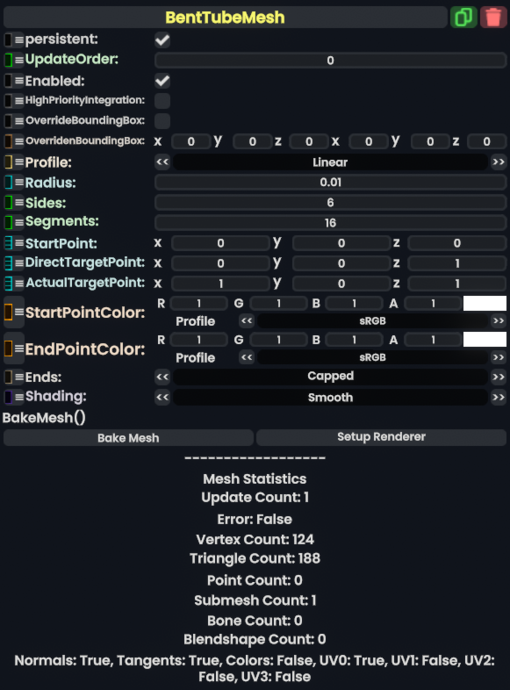
Bent tube mesh is a component that makes a tube structure.
Bent tube mesh is a component that makes a tube structure.
When calculating the curve, the generator uses a quadratic bezier curve formula. <code>StartPoint</code> being P0, <code>DirectTargetPoint</code> being P1, and <code>ActualTargetPoint</code> being P2.
When calculating the curve, the generator uses a modified Quadratic Bézier Curve formula; P0 being <code>StartPoint</code>, P2 being <code>ActualTargetPoint</code>, and P1 being <code>lerp(StartPoint, DirectTargetPoint, 2.0)</code>.
<!--T:2-->
<!--T:2-->
Line 21:
Line 21:
|Segments|Int| how many bends from end to end the tube should have
|Segments|Int| how many bends from end to end the tube should have
|StartPoint|Float3| Where the tube should start at in local space. Also known as P0 on a quadratic bezier curve.
|StartPoint|Float3| Where the tube should start at in local space. Also known as P0 on a quadratic bezier curve.
|DirectTargetPoint|Float3| P1 on the quadratic bezier curve in local space.
|DirectTargetPoint|Float3| avg(P0,P1) on the quadratic bezier curve in local space.
|ActualTargetPoint|Float3| P2 on the quadratic bezier curve in local space.
|ActualTargetPoint|Float3| P2 on the quadratic bezier curve in local space.
|StartPointColor|ColorX| What the color of the tube should be at the start if using a material that supports vertex colors.
|StartPointColor|ColorX| What the color of the tube should be at the start if using a material that supports vertex colors.
Line 36:
Line 36:
<!--T:3-->
<!--T:3-->
== Usage ==
== Usage ==
To create a proper Quadratic Bézier Curve, one can use a [[Component:LinearMapper3D|LinearMapper3D]] to convert the desired P1 directly into its needed DirectTargetPoint values with the following inputs:
* Source: null (leave empty)
* Target: DirectTargetPoint on BentTubeMesh
* SourceMin: -2
* SourceMax: -1
* TargetMin: Drive with StartPoint on BentTubeMesh
Bent tube mesh is a component that makes a tube structure.
When calculating the curve, the generator uses a modified Quadratic Bézier Curve formula; P0 being StartPoint, P2 being ActualTargetPoint, and P1 being lerp(StartPoint, DirectTargetPoint, 2.0).
If true, integrating this asset (e.g. processing procedural assets) gets higher priority than assets with this flag off. An example is user laser procedural meshes.
the bounding box this component should say it has when OverrideBoundingBox is enabled. Useful for bounding box calculations with Flux, or changing the selection box for this component when rendered.
Bake meshes is a sync method that creates a static mesh component with this component, replaces all references to this component with the static mesh component, then deletes this component.
Usage
To create a proper Quadratic Bézier Curve, one can use a LinearMapper3D to convert the desired P1 directly into its needed DirectTargetPoint values with the following inputs: