
Component:ItemTextureThumbnailSource: Difference between revisions
From Resonite Wiki
More actions
989onan bot (talk | contribs) Automated: update SyncDelegates |
989onan bot (talk | contribs) Automated: update SyncDelegates |
||
| Line 15: | Line 15: | ||
== Sync Delegates == | == Sync Delegates == | ||
{{Table ComponentTriggers | {{Table ComponentTriggers | ||
|OnEnsureSingleThumbnailSource[[Type:ButtonEventHandler|ButtonEventHandler]]|[[Type:ButtonEventHandler|ButtonEventHandler]]|true| | |OnEnsureSingleThumbnailSource:[[Type:ButtonEventHandler|ButtonEventHandler]]|[[Type:ButtonEventHandler|ButtonEventHandler]]|true| | ||
}} | }} | ||
Revision as of 06:31, 17 March 2025
Component image 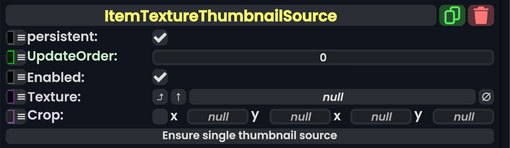
Item Texture Thumbnail Source component as seen in the Scene Inspector

The ItemTextureThumbnailSource component can be used to customize the inventory preview of an item, setting it to a texture.
Fields
| Name | Type | Description |
|---|---|---|
persistent
|
Bool | Determines whether or not this item will be saved to the server. |
UpdateOrder
|
Int | Controls the order in which this component is updated. |
Enabled
|
Bool | Controls whether or not this component is enabled. Some components stop their functionality when this field is disabled, but some don't. |
Texture
|
Texture2D | The texture that should be used as the item's inventory preview. If null, the component will be ignored. |
Crop
|
Nullable`1<Rect> | The rectangle that defines what section of the image to use. (Or null to use the entire image) |
Sync Delegates
| Method Name | Method type and Arguments. | Is the method hidden? | Description |
|---|---|---|---|
OnEnsureSingleThumbnailSource:ButtonEventHandler
|
ButtonEventHandler | ✓ |
Usage
To work, the component needs to be attached to the object's root slot and have an image in its Texture. The Ensure single thumbnail source button can be used to remove all other instances of the component in the item's hierarchy.
Examples
This component can be used when the automatically generated preview for an item isn't satisfying enough or you want to ensure that the preview looks the same every time or shows the item off in a certain way.
An example of an item that uses this is default Tools in the Resonite Essentials > Tools folder.