
Basic controls
From Resonite Wiki
More actions
For a more comprehensive page, see Controls.
-
 Desktop Controls
 -
 Valve Index Controllers
 -
 Vive Wand Controllers
 -
 Windows MR Controllers (Type 1)
 -
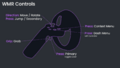 Windows MR Controllers (Type 2)
 -
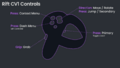 Oculus Rift CV1 Controllers
 -
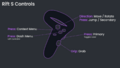 Oculus Rift S Controllers
 -
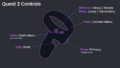 Meta Quest Controllers
 -
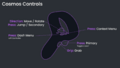 HTC Vive Cosmos Controllers


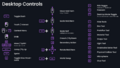
Desktop Controls
- Escape - Open/Close Dash
- Left Mouse Button or Y key - Primary action - Interact with UI / use equipped tool
- Right Mouse Button - Grab - Move objects
- T key or Middle Mouse Button - Context Menu
- R key or Mouse Button 4 - Secondary action
- WASD - Move (forward/left/backward/right)
- Space - Jump in walk/run locomotion, move up in fly & noclip locomotion
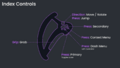
Index Controls
- A button - Open/Close Dash (Left controller)
- Trigger - Primary (Also toggles laser)
- Grip - Grab
- B button - Context menu
- Touchpad - Secondary
- Thumbstick - Move/rotate (Press to jump)
Quest / Rift S / CV1 / Cosmos / WMR Type 2 Controls
- X button - Open/Close Dash (Left controller)
- Trigger - Primary (Also toggles laser)
- Grip - Grab
- Y button - Context menu
- Thumbstick - Move/rotate (Press to jump/secondary)
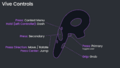
Vive Wand Controls
- Menu button - Context menu (Hold on left controller to open/close dash)
- Trigger - Primary (Also toggles laser)
- Grip - Grab
- Touchpad - Secondary (Press direction to move/rotate, press center to jump)
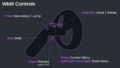
WMR Type 1 Controls
- Menu button - Context menu (Hold on left controller to open/close dash)
- Trigger - Primary (Also toggles laser)
- Grip - Grab
- Touchpad - Secondary/jump
- Thumbstick - Move/rotate