
基本的な操作
From Resonite Wiki
More actions
より詳しい操作方法は 操作方法をご覧ください。
-
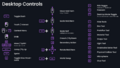 Desktop Controls
 -
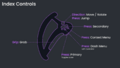 Valve Index Controllers
 -
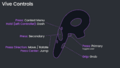 Vive Wand Controllers
 -
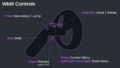 Windows MR Controllers (Type 1)
 -
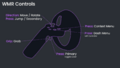 Windows MR Controllers (Type 2)
 -
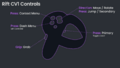 Oculus Rift CV1 Controllers
 -
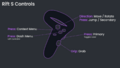 Oculus Rift S Controllers
 -
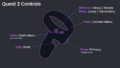 Meta Quest Controllers
 -
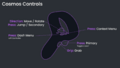 HTC Vive Cosmos Controllers


デスクトップモードでの操作
- Escキー - ダッシュメニューの開閉
- 左クリックまたはYキー - プライマリー - UIの操作や装備中のツールの操作に使います
- 右クリック - グラブ - オブジェクトを動かすのに使います
- Tキーまたはマウスホイールクリック - コンテキストメニューの開閉
- Rキー または マウスボタン4 - セカンダリー操作
- WASD - 移動(それぞれ前/左/後/右)
- スペースキー - 歩行ロコモーションではジャンプ、フライおよびノークリップでは上方向に移動します
Index コントローラー
- Aボタン - ダッシュメニューの開閉(左コントローラーのみ)
- トリガー - プライマリー(レーザーのオン・オフの切り替えも行えます)
- グリップ - グラブ操作
- Bボタン - コンテキストメニュー
- タッチパッド - セカンダリー
- ジョイスティック - 移動・回転(スティック押し込みでジャンプ)
Quest・Rift S・CV1・Cosmos・WMR Type 2 コントローラー
- X button - Open/Close Dash (Left controller)
- Trigger - Primary (Also toggles laser)
- Grip - Grab
- Y button - Context menu
- Thumbstick - Move/rotate (Press to jump/secondary)
Vive Wand Controls
- Menu button - Context menu (Hold on left controller to open/close dash)
- Trigger - Primary (Also toggles laser)
- Grip - Grab
- Touchpad - Secondary (Press direction to move/rotate, press center to jump)
WMR Type 1 Controls
- Menu button - Context menu (Hold on left controller to open/close dash)
- Trigger - Primary (Also toggles laser)
- Grip - Grab
- Touchpad - Secondary/jump
- Thumbstick - Move/rotate