
Component:RadiantSearchBar
The RadiantSearchBar component is most commonly used and found in the World Browser.
More actions
Component image 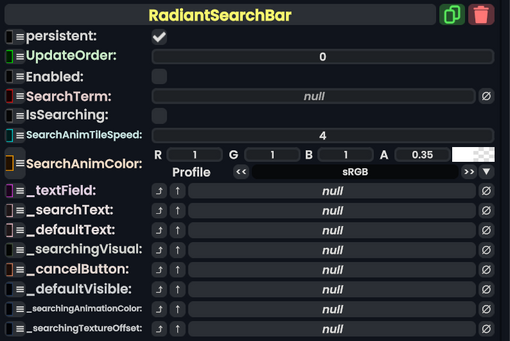
Radiant Search Bar component as seen in the Scene Inspector

The RadiantSearchBar component is most commonly used and found in the World Browser.
Fields
| Name | Type | Description |
|---|---|---|
persistent
|
Bool | Determines whether or not this item will be saved to the server. |
UpdateOrder
|
Int | Controls the order in which this component is updated. |
Enabled
|
Bool | Controls whether or not this component is enabled. Some components stop their functionality when this field is disabled, but some don't. |
SearchTerm
|
String | The term this is searching for. |
IsSearching
|
Bool | Whether this component is currently searching. |
SearchAnimTileSpeed
|
Float | How fast the search animation scrolling speed should be. |
SearchAnimColor
|
ColorX | What the color of the search bar should be while searching. |
_textField
|
TextField | The text field for entering a search. |
_searchText
|
direct RelayRef`1<Text> | The text UIX Component for searching |
_defaultText
|
Text | The text UIX Component that should be visible if a search term has not yet been entered. |
_searchingVisual
|
TiledRawImage | The visual to show while searching |
_cancelButton
|
Button | The button that can be used to cancel a currently running search. |
_defaultVisible
|
field drive of Bool | The field to drive with what should be visible by default. |
_searchingAnimationColor
|
field drive of ColorX | The field to drive for the color of the searching animation visual. |
_searchingTextureOffset
|
field drive of Float2 | The offset field to drive to create the searching animation scrolling visual. |
Sync Delegates
| Method Name | Type & Arguments | Hidden? | Description |
|---|---|---|---|
OnCancel:ButtonEventHandler
|
ButtonEventHandler | ✓ | Called when the cancel button is touched. |
Usage
This article or section is a stub. You can help the Resonite wiki by expanding it.
Examples
Used in the RedX UI.