
Component:CopyGlobalTransform
The CopyGlobalTransform component is used to ensure that one object has the exact same global transform (position and rotation) as another object.
More actions
This article or section is a stub. You can help the Resonite wiki by expanding it.
Component image 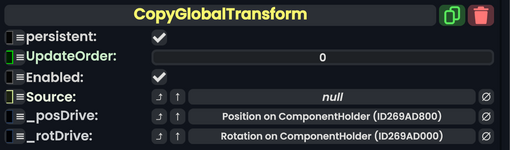
Copy Global Transform component as seen in the Scene Inspector

The CopyGlobalTransform component is used to ensure that one object has the exact same global transform (position and rotation) as another object.
It must be attached to the slot that you want to drive to work correctly. If you only need rotation or position, you can clear the unneeded drive.
This component also runs before any physics calculations and can help get around some bugs. GH#353
Fields
| Name | Type | Description |
|---|---|---|
persistent
|
Bool | Determines whether or not this item will be saved to the server. |
UpdateOrder
|
Int | Controls the order in which this component is updated. |
Enabled
|
Bool | Controls whether or not this component is enabled. Some components stop their functionality when this field is disabled, but some don't. |
Source
|
Slot | The object that serves as the transform reference. |
_posDrive
|
field drive of Float3 | The field that is driven to match the global position of the source. This automatically gets populated with the position field of the slot that this component is added to. |
_rotDrive
|
field drive of FloatQ | The field that is driven to match the global rotation of the source. This automatically gets populated with the rotation field of the slot that this component is added to. |
Usage
Examples
Related Components
Component:CopyGlobalScale - The matching one for Scale