
Component:Projection360Material
From Resonite Wiki
More actions
(Redirected from Projection360Material (Component))
This article or section is a stub. You can help the Resonite wiki by expanding it.
Component image 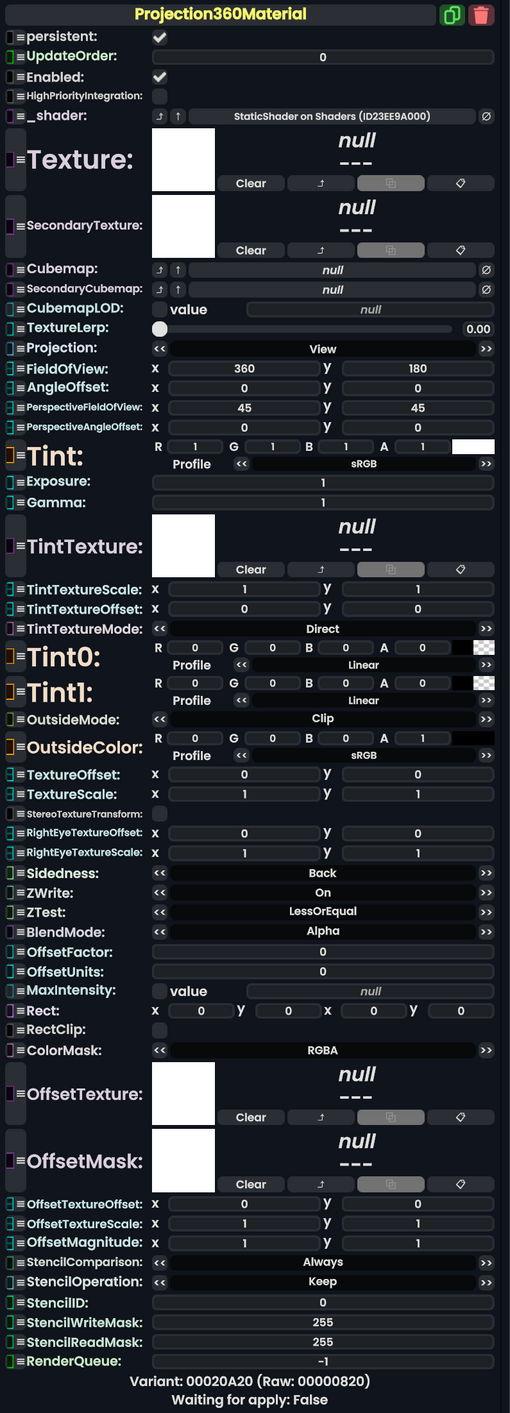
Projection360 Material component as seen in the Scene Inspector

Fields
| Name | Type | Description |
|---|---|---|
persistent
|
Bool | Determines whether or not this item will be saved to the server. |
UpdateOrder
|
Int | Controls the order in which this component is updated. |
Enabled
|
Bool | Controls whether or not this component is enabled. Some components stop their functionality when this field is disabled, but some don't. |
HighPriorityIntegration
|
Bool | If true, integrating this asset (e.g. processing procedural assets) gets higher priority than assets with this flag off. An example is user laser procedural meshes. |
_shader
|
Shader | Internal. |
Texture
|
ITexture2D | The primary texture to use for the skybox when TextureLerp is at 0.
|
SecondaryTexture
|
ITexture2D | The secondary texture to use for the skybox when TextureLerp is at 1.
|
Cubemap
|
Cubemap | A cubemap override to use to make the skybox when TextureLerp is at 0.
|
SecondaryCubemap
|
Cubemap | A cubemap override to use to make the skybox when TextureLerp is at 1.
|
CubemapLOD
|
Nullable`1<Float> | which LOD to use of the Cubemap |
TextureLerp
|
Float | How much to lerp between set 1 or 2 for this material. |
Projection
|
Mode | How to handle projection of the skybox texture for this skybox. |
FieldOfView
|
Float2 | What area of the texture to sample of the skybox in terms of FOV. |
AngleOffset
|
Float2 | how much to shift the skybox sample area by in degrees. |
PerspectiveFieldOfView
|
Float2 | What area of the texture to sample of the skybox in terms of perspective FOV. |
PerspectiveAngleOffset
|
Float2 | how much to shift the skybox sample area by in perspective degrees. |
Tint
|
ColorX | What color to multiply the skybox with. |
Exposure
|
Float | How much exposure or brightness should be given to the sky. |
Gamma
|
Float | the gamma effect. |
TintTexture
|
ITexture2D | A texture to multiply the colors of the material by |
TintTextureScale
|
Float2 | how much to scale up or down the uvs of the tint texture on the material |
TintTextureOffset
|
Float2 | how much to shift the uvs of the tint texture on the material |
TintTextureMode
|
TintMode | The Projection360+TintMode to use with this material. |
Tint0
|
ColorX | The Tint to use when TextureLerp is at 0.
|
Tint1
|
ColorX | The Tint to use when TextureLerp is at 1.
|
OutsideMode
|
Outside | The Projection360+OutsideMode to use with this material. |
OutsideColor
|
ColorX | The Color to use when viewing outside the skybox |
TextureOffset
|
Float2 | How much to shift around the position of the different texture maps. |
TextureScale
|
Float2 | How much to scale up or down the different texture maps. |
StereoTextureTransform
|
Bool | Whether a texture on the surface should appear different in the right eye. |
RightEyeTextureOffset
|
Float2 | The override for texture in the right eye for offset. |
RightEyeTextureScale
|
Float2 | The override for texture in the right eye for scale. |
Sidedness
|
Sidedness | Render on both sides of the mesh, front, or back. |
ZWrite
|
ZWrite | whether this material should respect the distance it is from the camera. |
ZTest
|
ZTest | Determines whether this object should render when it is in front of or behind other objects that respect depth from the camera |
BlendMode
|
BlendMode | How to blend this material's colors vs what it rendered on top of. |
OffsetFactor
|
Float | How much this material should be pushed forwards or backwards on the depth buffer (negative is closer), adjusted for the polygon's slope relative to the camera's near and far planes. This can be used to sort overlapping geometry that would otherwise Z-fight.[1] |
OffsetUnits
|
Float | How much this material should be pushed forwards or backwards on the depth buffer (negative is closer), in units equal to the smallest possible difference for the rendering device being used.[1] |
MaxIntensity
|
Nullable`1<Float> | The max intensity of the brightness of the material |
Rect
|
Rect | See RectClip on Materials. |
RectClip
|
Bool | Toggles if the material should use Rect
|
ColorMask
|
ColorMask | What colors behind the material should make it through the filter. |
OffsetTexture
|
ITexture2D | The texture used to offset the positions of pixels. |
OffsetMask
|
ITexture2D | The mask to use for material offset effects before applying the actual offset effect. |
OffsetTextureOffset
|
Float2 | How much to offset the detail of the OffsetTexture
|
OffsetTextureScale
|
Float2 | How much to scale the detail of the OffsetTexture
|
OffsetMagnitude
|
Float2 | How much to amplify the offset effect. |
StencilComparison
|
StencilComparison | See Type:StencilComparison for an in depth explanation on what this does. |
StencilOperation
|
StencilOperation | See Type:StencilOperation for an in depth explanation on what this does. |
StencilID
|
Byte | The Stencil ID of this material. This is sometimes written to the frame buffer's Stencil mask, or used to determine whether this material should render for a particular pixel. |
StencilWriteMask
|
Byte | does a Bitwise AND with this number for every pixel in the frame buffer this is rendering on top of when this object is drawn, after reading from the buffer. |
StencilReadMask
|
Byte | is bitwise ANDed with the Stencil in the frame buffer before the test compares them. |
RenderQueue
|
Int | changes at which point a material renders on the render stack |
Mode
| Name | Value | Description |
|---|---|---|
View
|
0 | |
WorldspaceView
|
1 | |
Normal
|
2 | |
Perspective
|
3 |
OutsideMode
| Name | Value | Description |
|---|---|---|
Clip
|
0 | |
Color
|
1 | |
Clamp
|
2 |
TintMode
| Name | Value | Description |
|---|---|---|
Direct
|
0 | |
Lerp
|
1 |