Toggle menu
Toggle preferences menu
Toggle personal menu
Not logged in
Your IP address will be publicly visible if you make any edits.

Component:SkinnedMeshRenderer

SkinnedMeshRenderer component is used for rendering animated/dynamic 3D meshes in the world, and applying materials to that mesh.
This article or section is a stub. You can help the Resonite wiki by expanding it.
Component image 
SkinnedMeshRenderer component as seen in the Scene Inspector

The SkinnedMeshRenderer component is used for rendering animated/dynamic 3D meshes in the world, and applying materials to that mesh. While it can be used for rendering static meshes, it is not recommended as there is a slight performance penalty for using SkinnedMeshRenderer, even if the animation features aren't used — Please try to use MeshRenderer where possible.

Fields

Fields
Name Type Description
persistent Bool Determines whether or not this item will be saved to the server.
UpdateOrder Int Controls the order in which this component is updated.
Enabled Bool Controls whether or not this component is enabled. Some components stop their functionality when this field is disabled, but some don't.
Mesh Mesh The mesh to be rendered. Can be a StaticMesh or a Procedural Mesh
Materials list of Material A list of materials to be applied to the mesh
MaterialPropertyBlocks list of MaterialPropertyBlock A list of material property blocks to apply to the materials on this mesh. Usually used for performance reasons where using multiple similar materials would take more resources.
ShadowCastMode ShadowCastMode How this object will cast shadows onto the world, or if it only draws a shadow.
MotionVectorMode MotionVectorMode See Motion vector mode.
SortingOrder Int Whether to render this before or after other renderers with geometry in the same location.
BoundsComputeMethod SkinnedBounds How the bounds of this mesh will be calculated. Should be left as Static if possible, for performance reasons.
ProxyBoundsSource SkinnedMeshRenderer A SkinnedMeshRenderer to use the ExplicitLocalBounds of rather than the ExplicitLocalBounds on this component.
ExplicitLocalBounds BoundingBox A box that within view will render the mesh, and when out of view will cull the mesh and stop rendering it. Is used when ProxyBoundsSource is null.
Bones list of Slot Automatically Assigned — List of bones present in this mesh
BlendShapeWeights direct SyncFieldList`1<Float> Automatically Assigned — List of blendshapes present in this mesh, and their respective weights.

Sync delegates

Triggers
Method Name Method type and Arguments. Is the method hidden? Description
SplitBlenshapeAlongAxis:Func`7<Int, Axis3D, Float, Float, String, String, Task`1<Bool>> Func`7<Int, Axis3D, Float, Float, String, String, Task`1<Bool>> X Splits a blendshape along a given axis, and returns a task representing if the operation is done yet.
BakeBlendshape:Func`2<Int, Task`1<Bool>> Func`2<Int, Task`1<Bool>> X bakes a blendshape to make it part of the mesh rest state, and returns a task representing if the operation is done yet.
RemoveBlendshape:Func`2<Int, Task`1<Bool>> Func`2<Int, Task`1<Bool>> X removes a blendshape from the mesh, and returns a task representing if the operation is done yet.
VisualizeApproximateBoneBounds:ButtonEventHandler ButtonEventHandler Makes a series of boxes showing the bounds of the bones in the mesh.
VisualizeBoneBounds:ButtonEventHandler ButtonEventHandler Makes a series of boxes showing the bounds of the bones in the mesh.
ClearBoundsVisuals:ButtonEventHandler ButtonEventHandler clears bound visuals.
SeparateOutBlendshapes:ButtonEventHandler ButtonEventHandler Separates out the blendshape affected mesh parts from the non blendshape affected mesh parts.
StripEmptyBlendshapes:ButtonEventHandler ButtonEventHandler Removes blendshapes that don't change anything.
BakeNonDrivenBlendshapes:ButtonEventHandler ButtonEventHandler Bakes all blendshapes on the mesh that aren't driven based on their current value, making it part of the rest state.
BakeToStaticMesh:ButtonEventHandler ButtonEventHandler Bakes the mesh and makes it a static mesh instead.
MergeBlendshapes:ButtonEventHandler ButtonEventHandler Combine all blendshapes in to one blendshape, which interpolates between the source blendshapes like a playback timeline.
StripEmptyBones:ButtonEventHandler ButtonEventHandler Gets rid of bones that have no vertices assigned to them.
ComputeExplicitBoundsFromPose:ButtonEventHandler ButtonEventHandler Computes the explicit bounds property for the skinned mesh renderer component based on it's current pose of it's bones.
ExtendExplicitBoundsFromPose:ButtonEventHandler ButtonEventHandler extends the bounds of the explicit bounds property for the skinned mesh renderer component based on it's current pose of it's bones.
SortBlendshapesByName:ButtonEventHandler ButtonEventHandler Sorts blendshapes by name in alphabetical order.
SortBlendshapesByNameLength:ButtonEventHandler ButtonEventHandler Sorts blendshapes by how many characters are in a given blendshape name.
SplitSubmeshes:Action Action X Will split this mesh into additional submeshes, each having only one material
MergeByMaterial:Action Action X Will merge all submeshes that use the same material

Usage

While it can be used for rendering static meshes, it is not recommended as there is a slight performance penalty for using SkinnedMeshRenderer, even if the animation features aren't used — Please try to use MeshRenderer where possible.

Optimization

StripEmptyBlendshapes and StripEmptyBones can be useful for removing unneeded bones or blendshapes. They remove Blendshapes and Bones that don't 'do' anything to the mesh referenced by the component. While they don't have any real performance impacts it does clear up a lot of visual clutter from the interface and makes working on assets easier. For example by removing empty bones from a clothing item it's easier to see what bones actually need to be referenced.

Blendshape removal

Blendshapes are adjustable transforms that modify the original mesh in some way. They are used for a lot of the customization in avatars as well as jaw or expression movements.

For a number of reasons, from performance to removal of unwanted assets, you may wish to delete blendshapes and there are tools to help, depending on how your avatar was created different methods may work in different ways, for example some blendshapes simply move mesh inside the main body but don't change the mesh, such as claws or horns. Others may shrink the mesh down to a very small size, for example clothing and others still change the main mesh it'self, for example blendshapes that change the size of body parts.

  • RemoveBlendshape
    • This removes the controls for the blendshapes, it may not change the original data.
  • SeparateOutBlendshapes
    • Duplicates the parts of the mesh that would be changed by the blendshape and makes it into a separate mesh that can then be deleted or disabled as another item.
    • This is commonly used to make clothing that is done as blendshapes into separated meshes.
    • When this works this is also is one of the be the most secure way to remove a blendshape, it can break some avatars.
  • BakeBlendshape
    • 'Bakes' the blendshape into the selected position, depending on exactly what it does, it can either completely remove or leave traces of the original mesh behind.
    • If being used to remove an asset care should be taken to ensure that the asset is completely removed.

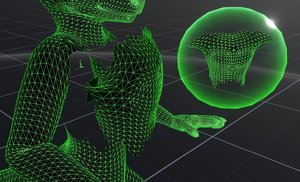
Changing the MeshRenderer's material to Component:WireframeMaterial can be a good way to check what mesh data your avatar or other item contains. This can also be done by grabbing the 'Mesh' field from the component, dragging it out of the inspector and pressing Primary to display a Mesh Orb but as such orbs cannot be resized by default this can be harder to use.



Examples

See also