
Component:DesktopController
From Resonite Wiki
More actions
Component image 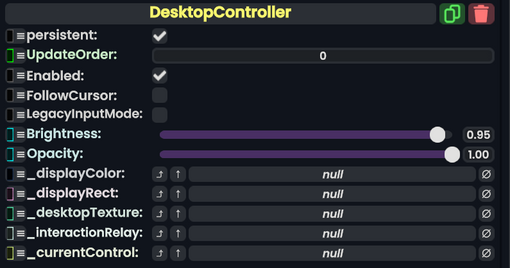
Desktop Controller component as seen in the Scene Inspector

The DesktopController component is used to control the desktop through the game dash.
Fields
| Name | Type | Description |
|---|---|---|
persistent
|
Bool | Determines whether or not this item will be saved to the server. |
UpdateOrder
|
Int | Controls the order in which this component is updated. |
Enabled
|
Bool | Controls whether or not this component is enabled. Some components stop their functionality when this field is disabled, but some don't. |
FollowCursor
|
Bool | whether the desktop cursor should follow the Resonite dash cursor when not clicking. |
LegacyInputMode
|
Bool | Whether to use the legacy input system for desktop interaction. |
Brightness
|
Float | how bright the desktop display should be in the dash. |
Opacity
|
Float | how transparent the desktop display should be in the dash. |
_displayColor
|
field drive of ColorX | The color of the display texture to drive |
_displayRect
|
RectTransform | The UIX size rectangle for the display texture. |
_desktopTexture
|
DesktopTextureProvider | The texture displaying the desktop. |
_interactionRelay
|
DesktopInteractionRelay | The relay allowing for system Desktop interaction. |
_currentControl
|
DesktopControlDialog | The current dialogue being used to change settings for this component. |
Examples
Used in the desktop dash tab to control and view the desktop.