
Component:StringQRCodeTexture
The StringQRCodeTexture Component is used to encode string data like URLs and text into a QR code texture.
More actions
Component image 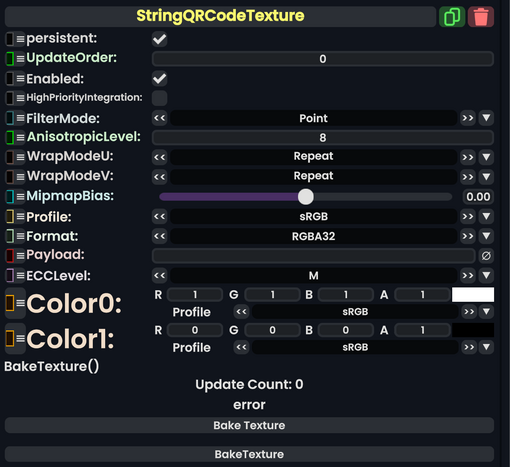
String QRCode Texture component as seen in the Scene Inspector

The StringQRCodeTexture Component is used to encode string data like URLs and text into a QR code texture.
Fields
| Name | Type | Description |
|---|---|---|
persistent
|
Bool | Determines whether or not this item will be saved to the server. |
UpdateOrder
|
Int | Controls the order in which this component is updated. |
Enabled
|
Bool | Controls whether or not this component is enabled. Some components stop their functionality when this field is disabled, but some don't. |
HighPriorityIntegration
|
Bool | If true, integrating this asset (e.g. processing procedural assets) gets higher priority than assets with this flag off. An example is user laser procedural meshes. |
FilterMode
|
TextureFilterMode | How to handle the interpolation between pixels. |
AnisotropicLevel
|
Int | The levels of Anisotropic filtering distances when using Anisotropic for FilterMode
|
WrapModeU
|
TextureWrapMode | How to repeat or mirror the texture along the X axis. this goes into affect when X values are outside of the range [0.0 to 1.0]. |
WrapModeV
|
TextureWrapMode | How to repeat or mirror the texture along the Y axis. this goes into affect when Y values are outside of the range [0.0 to 1.0]. |
MipmapBias
|
Float | Whether to see lower resolution versions of the texture closer up or not (MipMaps). |
Profile
|
ColorProfile | The color profile to use for this texture's rendering. |
Format
|
TextureFormat | TextureFormat describes how Texture's pixel are stored in the VRAM. |
Payload
|
String | The string to encode into the QR code. |
ECCLevel
|
ECCLevel | The level of error correction to encode (for use with a dirty QR code for higher values) |
Color0
|
ColorX | The background color of the QR code |
Color1
|
ColorX | The color of the usually black squares of the QRCode |
Sync Delegates
| Method Name | Type & Arguments | Hidden? | Description |
|---|---|---|---|
BakeTexture:Action
|
Action | X | BakeTexture first generates a Component:StaticTexture2D that is the same as this procedural texture. The resulting static texture replaces every reference to the original procedural texture. Lastly the original procedural texture is deleted. |
Usage
Attach to a slot and insert into a material to view the result. Don't forget to provide a Payload.
Examples
QR code generated from an URL:
