
Component:FileVisual
The FileVisual component is used to handle the creation and interfacing with a file object, which is spawned into the world from inventory or using the "Raw" option when Importing.
More actions
Component image 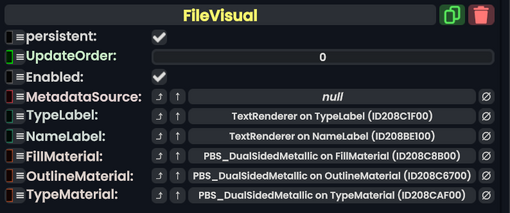
File Visual component as seen in the Scene Inspector

The FileVisual component is used to handle the creation and interfacing with a file object, which is spawned into the world from inventory or using the "Raw" option when Importing.
Files
| Name | Type | Description |
|---|---|---|
persistent
|
Bool | Determines whether or not this item will be saved to the server. |
UpdateOrder
|
Int | Controls the order in which this component is updated. |
Enabled
|
Bool | Controls whether or not this component is enabled. Some components stop their functionality when this field is disabled, but some don't. |
MetadataSource
|
direct RelayRef`1<FileMetadata> | The component that handles importing and storing the file data this component is representing the visual of. |
TypeLabel
|
TextRenderer | The label that determines the file type/extension (aka the "png" part of "hello.png") |
NameLabel
|
TextRenderer | The name of the file before the extension (aka the "hello" part of "hello.png") |
FillMaterial
|
PBS_DualSidedMetallic | The material being used for the file icon in the center. |
OutlineMaterial
|
PBS_DualSidedMetallic | The material being used to outline the file icon. |
TypeMaterial
|
PBS_DualSidedMetallic | The material being used to color the file type. this can be orange for models, and the color varies based on file type. |
Usage
Is used by the game to generate and handle the visuals of raw files. Is usually not directly utilized by the player.
Examples
This article or section is a stub. You can help the Resonite wiki by expanding it.
We need a picture of an imported raw file (what about the whats this.owo picture meme)