
Component:MicrophoneTool
See Microphone.
More actions
Component image 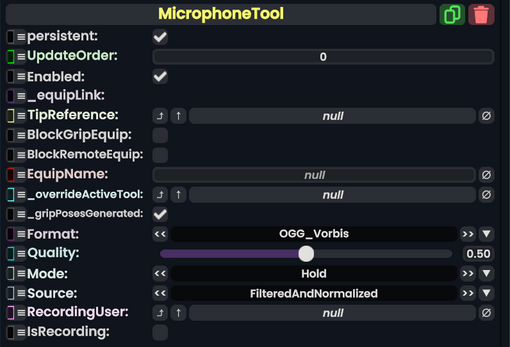
Microphone Tool component as seen in the Scene Inspector

See Microphone.
Usage
| Name | Type | Description |
|---|---|---|
persistent
|
Bool | Determines whether or not this item will be saved to the server. |
UpdateOrder
|
Int | Controls the order in which this component is updated. |
Enabled
|
Bool | Controls whether or not this component is enabled. Some components stop their functionality when this field is disabled, but some don't. |
_equipLink
|
direct LinkTarget`1<ITool> | This is Internal, and is used by the engine to retrieve the component this field is a part of. It cannot be assigned to. |
TipReference
|
Slot | The slot to use as the tool's tip, instead of the component's slot. (this heavily improves desktop compatibility) |
BlockGripEquip
|
Bool | Whether to prevent legacy double grip equipping from equipping this tooltip. |
BlockRemoteEquip
|
Bool | Whether to prevent equipping by clicking via laser |
EquipName
|
String | The name of the tool in the context menu when equipping via context menu. |
_overrideActiveTool
|
InteractionHandler | The interaction handler to use instead of this tool as an interaction handler. |
_gripPosesGenerated
|
Bool | Whether the Grip Pose Reference components and slots have been generated for this tool. |
Format
|
MicrophoneTool.RecordFormat | The type of audio file to make. |
Quality
|
Float | The quality of the resulting audio clip file. (only relevant for Format=OGG_Vorbis)
|
Mode
|
MicrophoneTool.RecordMode | Whether the user has to hold or it's a toggle. |
Source
|
MicrophoneTool.DataSource | The way to record the audio. |
RecordingUser
|
User | The user that is currently recording using the Tool. |
RecordingStartTime
|
direct SyncTime | The time that the user started recording in world time. |
IsRecording
|
raw output of Bool | Whether the tool is currently being used to record. |
RecordFormat
| Name | Value | Description |
|---|---|---|
WAV
|
0 | Uncompressed, lossless audio format (see FLAC for a compressed alternative)
|
OGG_Vorbis
|
1 | Lossy compression which makes files smaller at the cost of quality
This can be adjusted using the |
FLAC
|
2 | Compressed and lossless (="high quality") format. [1] |
RecordMode
| Name | Value | Description |
|---|---|---|
Hold
|
0 | The user has to hold Primary down to record |
Press
|
1 | The user has to press Primary to start recording and then press it again to stop recording. |
DataSource
| Name | Value | Description |
|---|---|---|
FilteredAndNormalized
|
0 | Normalized audio, makes audio recording consistent between mic gains and reduces background noise with filters. |
Raw
|
1 | Raw audio, no normalization |
Usage
See Microphone.
Examples
See Microphone.