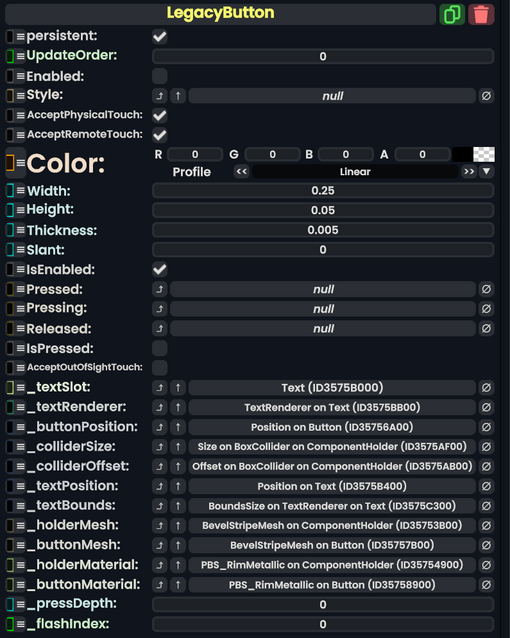
legacy & old & deprecated but still helps to be useful
(2 intermediate revisions by 2 users not shown)
Line 1:
Line 1:
{{Infobox Component
{{Legacy}}{{Infobox Component
|Image=LegacyButtonComponent.png
|Image=LegacyButtonComponent.png
|Name=Legacy Button
|Name=Legacy Button
Line 15:
Line 15:
|Thickness|Float| How thick the button is.
|Thickness|Float| How thick the button is.
|Slant|Float| How much Bevel the button should have.
|Slant|Float| How much Bevel the button should have.
|IsEnabled|Bool| Whether the button is enabled and can be used.
|IsEnabled|Bool| {{Template:LegacyUI_IsEnabled}}
|Pressed|{{RootFieldType|SyncDelegate`1|[[Type:ButtonEventHandler|ButtonEventHandler]]}}|TypeAdv9=true| The Sync delegate to call when this button is pressed.
|Pressed|{{RootFieldType|SyncDelegate`1|[[Type:ButtonEventHandler|ButtonEventHandler]]}}|TypeAdv9=true| The Sync delegate to call when this button is pressed.
|Pressing|{{RootFieldType|SyncDelegate`1|[[Type:ButtonEventHandler|ButtonEventHandler]]}}|TypeAdv10=true| The Sync delegate to call per engine update as this button is being held down.
|Pressing|{{RootFieldType|SyncDelegate`1|[[Type:ButtonEventHandler|ButtonEventHandler]]}}|TypeAdv10=true| The Sync delegate to call per engine update as this button is being held down.
Line 37:
Line 37:
== Usage ==
== Usage ==
Just no.
Add to an empty slot to automatically create materials, meshes & colliders on the slot this was added to and 2 (automatically created) child slots. From there it will act like any other button component.
== Examples ==
== Examples ==
Latest revision as of 23:04, 15 January 2026
This article describes a feature marked as legacy—this usually means there's a newer, better alternative. Legacy features might not be removed but they will not be updated, and the team will not provide any support for them.
The LegacyButton component is a leftover Component from content migrated from other platforms. It should not be used, and should be replaced whenever possible.
How much to add to the emission of the holder material.
Usage
Add to an empty slot to automatically create materials, meshes & colliders on the slot this was added to and 2 (automatically created) child slots. From there it will act like any other button component.