
Component:ReflectionMaterial: Difference between revisions
From Resonite Wiki
More actions
989onan bot (talk | contribs) Automated: update 'StencilComparison' description,'StencilOperation' description,'StencilID' description,'StencilWriteMask' description,'StencilReadMask' description,'RenderQueue' description,'BlendMode' description,'Sidedness' description,'ZWrite' description,'ZTest' description,'OffsetFactor' description,'OffsetUnits' description, |
989onan bot (talk | contribs) Automated: update 'StencilComparison' description,'StencilOperation' description,'StencilID' description,'StencilWriteMask' description,'StencilReadMask' description,'RenderQueue' description,'BlendMode' description,'Sidedness' description,'ZWrite' description,'ZTest' description,'OffsetFactor' description,'OffsetUnits' description, |
||
| Line 19: | Line 19: | ||
|Distort|Float| How much effect the normal map should have on the reflection. | |Distort|Float| How much effect the normal map should have on the reflection. | ||
|TintColor|ColorX| What color to tint the projected image. | |TintColor|ColorX| What color to tint the projected image. | ||
|BlendMode|BlendMode|{{Template: | |BlendMode|BlendMode|{{Template:Material_BlendMode_Desc}} | ||
|AlphaCutoff|Float| If the reflected image has alpha, then render nothing for alpha below this threshold. | |AlphaCutoff|Float| If the reflected image has alpha, then render nothing for alpha below this threshold. | ||
|Sidedness|Sidedness|{{Template:Material_Sidedness_Desc}} | |Sidedness|Sidedness|{{Template:Material_Sidedness_Desc}} | ||
Revision as of 00:50, 14 November 2024
Component image 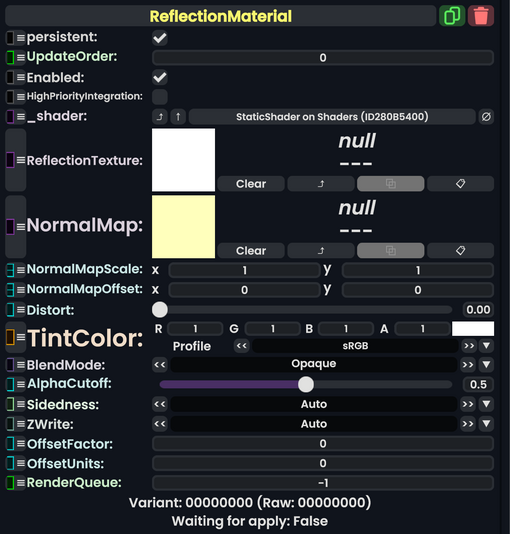
Reflection Material component as seen in the Scene Inspector

Used with Camera Portals to render what the component sees into a visual result. Like mirrors, portals, a Tardis, gateways, and Non-Euclidean tunnels.
Fields
| Name | Type | Description |
|---|---|---|
persistent
|
Bool | Determines whether or not this item will be saved to the server. |
UpdateOrder
|
Int | Controls the order in which this component is updated. |
Enabled
|
Bool | Controls whether or not this component is enabled. Some components stop their functionality when this field is disabled, but some don't. |
HighPriorityIntegration
|
Bool | If true, integrating this asset (e.g. processing procedural assets) gets higher priority than assets with this flag off. An example is user laser procedural meshes. |
_shader
|
Shader | Internal. |
ReflectionTexture
|
ITexture2D | A texture usually generated by a Camera Portal or previously rendered by a Camera Portal. |
NormalMap
|
ITexture2D | What normal map to use on the reflected image. This can be used as a way to create an illusion of moving heat in a portal gateway, or to add irregularity in the surface of a mirror. |
NormalMapScale
|
Float2 | The scaling of the normal map across the rendered surface. |
NormalMapOffset
|
Float2 | The offset position of the normal map across the rendered surface. |
Distort
|
Float | How much effect the normal map should have on the reflection. |
TintColor
|
ColorX | What color to tint the projected image. |
BlendMode
|
BlendMode | How to blend this material's colors vs what it rendered on top of. |
AlphaCutoff
|
Float | If the reflected image has alpha, then render nothing for alpha below this threshold. |
Sidedness
|
Sidedness | Render on both sides of the mesh, front, or back. |
ZWrite
|
ZWrite | whether this material should respect the distance it is from the camera. |
OffsetFactor
|
Float | How much this material should be pushed forwards or backwards on the depth buffer, based on the polygon's slope relative to the camera (i.e. polygons parallel to the camera will not be affected by this).[1] |
OffsetUnits
|
Float | How much this material should be pushed forwards or backwards on the depth buffer (regardless of the polygon's slope relative to the camera), in units equal to the smallest possible difference for the rendering device being used.[1] |
RenderQueue
|
Int | changes at which point a material renders on the render stack |
Usage
Attach to a slot and provide the needed render texture to view, which is usually generated by a camera portal. The material will then show either a mirror or portal like effect.